
Smash Casino app: download and install on Android and iOS
The Smash Casino app is a web app: instead of an APK or a store download, you add the mobile site to your home screen and get an icon that opens the full casino in one tap. It takes about 30 seconds on Android and iPhone, costs nothing and never needs updating.
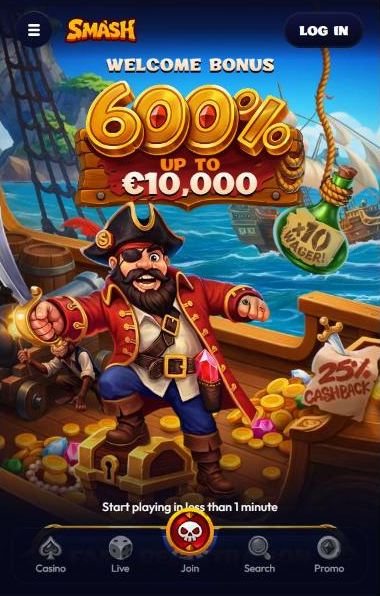
600% Welcome package up to €10,000 — also available in the app · 18+
Smash Casino app at a glance
We tested the mobile version on a phone-sized screen on 20 October 2026. This is what you get:
| App type | Web app installed as a home-screen icon |
|---|---|
| Price | Free |
| Download size | None — no file is installed |
| Platforms | Android, iPhone, iPad and any phone with a modern browser |
| APK / Google Play / App Store | Not offered on the official site |
| Products | Casino, Live Casino, Sports, Predictions, Promotions |
| Languages | 11, including English, German, Spanish and French |
| Welcome bonus | Slots 600% up to €10,000 · Live 300% up to €2,250 · Sports 250% up to €5,000 |
| Mobile payments | Apple Pay, Google Pay, Klarna, cards, bank transfer, crypto |
| Support | 24/7 live chat from the mobile menu |
| Updates | Automatic — always the current version |
How to install the Smash Casino app on Android
Open the official site in Chrome
Type smash.casino into the address bar. It forwards you to the current working address automatically.
Tap the menu (three dots)
The ⋮ button sits in the top-right corner of Chrome.
Select “Add to Home screen”
Depending on your Chrome version, the next dialog may offer “Install” or “Create shortcut” — either works.
Confirm the name and tap Add
Keep “Smash” or type your own label. The icon appears on your home screen.
Open Smash from the icon
The casino opens straight on the homepage — no address bar typing needed.
Is Smash Casino on Google Play?
No. A Smash Casino download from Google Play does not exist: the official site does not link to the store and does not offer an APK file. That is common for casino brands, because store rules for real-money gambling apps differ from country to country. Any “Smash Casino APK” offered on other websites is not from the casino.
Android requirements
- A current version of Chrome, Samsung Internet or Firefox.
- JavaScript and cookies enabled — the site uses a Cloudflare security check.
- A stable Wi-Fi or 4G/5G connection, especially for live dealer tables.
How to install the Smash Casino app on iPhone and iPad
Open the official site in Safari
Type smash.casino and wait for the homepage to load.
Tap the Share icon
The square with an arrow sits at the bottom of the screen on iPhone and at the top on iPad.
Choose “Add to Home Screen”
Scroll down the share sheet if you do not see it straight away.
Tap Add
The Smash icon appears next to your other apps.
Log in and play
Use the same account as on desktop — balance and bonuses are shared.
Is Smash Casino on the App Store?
No App Store listing is linked from the official site. On iPhone and iPad the home-screen web app is the way to play, and it opens the same casino, live casino and sportsbook as the desktop site.
iOS requirements
- Safari with cookies allowed (Settings → Safari → “Block All Cookies” switched off).
- Enough battery and a stable connection for long live sessions.
What the Smash mobile app looks like
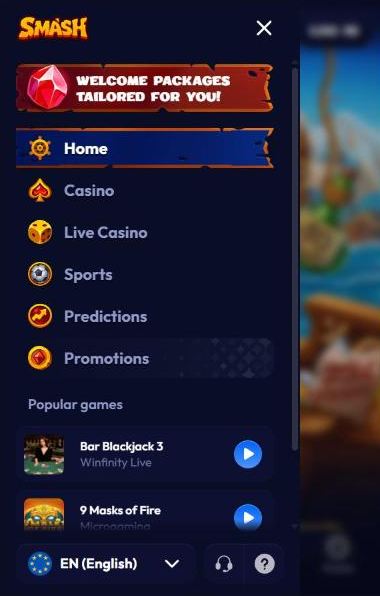
On a phone the desktop sidebar disappears. The header keeps the menu button, the Smash logo and a Log In button, and a fixed bottom bar gives one-tap access to Casino, Live, Join, Search and Promo. The menu opens the full navigation — Home, Casino, Live Casino, Sports, Predictions and Promotions — plus a list of popular games, the language switch and the support icon.
The middle button of the bottom bar, Join, is the shortcut to registration, while Search opens the game finder from any page. Promo leads to the welcome and weekly packages, so new and returning players reach the bonuses in one tap. The language switch at the bottom of the menu changes the interface between 11 languages, including English, German, Spanish and French.
Sign up and log in from your phone
Tap Join in the bottom bar or Fast Registration on the banner. The mobile form has the same two steps as on desktop: choose a welcome package (or no bonus), enter e-mail and password, check country and currency and confirm you are 18+. Existing players tap Log In in the header.
Typing on a phone is where most sign-up mistakes happen, so double-check the e-mail address — it is used for password resets and for self-exclusion requests. Let your phone’s password manager suggest a strong password, keep the country and currency matching your real residence, and leave the marketing tick box empty if you do not want promotional SMS. If you forget your password later, the “Forgot password?” link under the login form sends a reset e-mail. Every field is explained in our registration guide.
Slots in the Smash Casino app
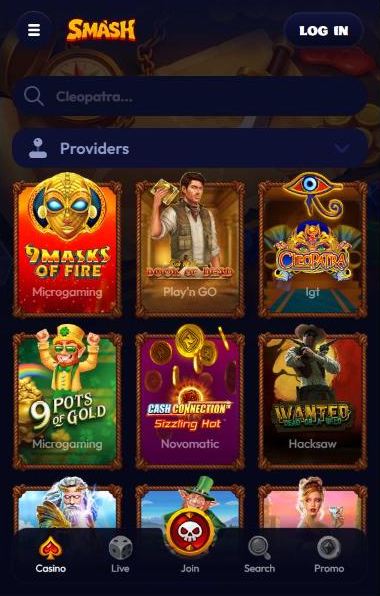
All 3,723 casino games from 48 studios load in the mobile browser. The lobby keeps its search field and Providers filter on top and shows games in a three-column grid, so finding Book of Dead or a new Hacksaw release takes seconds. Slots open in portrait or landscape — turning the phone sideways gives most modern titles a larger reel area, while classic fruit machines are easier to play upright.
Collections work well on a small screen: “One-Cent Wonders” gathers 168 penny slots for short sessions, and “Crash Games” offers 60 quick titles such as Aviator, Mines and Plinko that are built for touch controls. Keep an eye on battery and data — slots use little data, but long sessions drain the battery faster than you might expect. Studios, collections and popular titles are listed on our page about slot machines.
Live dealer games on mobile
The Live tab in the bottom bar opens the 99 live games, including multiplier roulette from 7Mojos and blackjack from Iconic21 and Vivo Gaming. Streams adapt to the screen, but a stable connection matters more here than anywhere else.
- Use Wi-Fi when you can: a live stream uses far more data than a slot or the sportsbook.
- Turn the phone sideways for a bigger view of the table and the betting grid.
- Pick quick games on the go: auto roulette, Dragon Tiger and the BetGames draws suit short sessions better than a full blackjack shoe.
- Silence notifications from other apps so a pop-up does not cover the bet buttons before the timer runs out.
All 99 tables, studios and the live package are covered in our live casino section.
Sports betting in the app
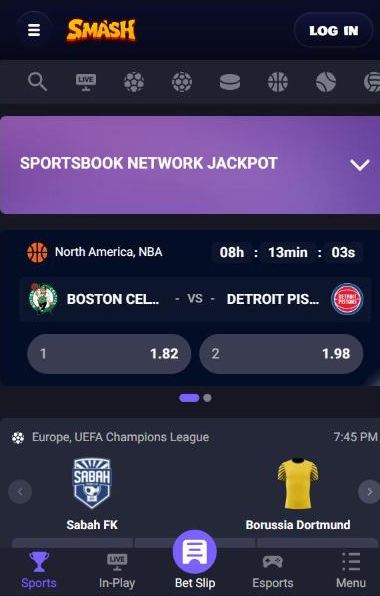
The sportsbook switches to its own mobile layout: an icon row for search, live events and each sport, the Sportsbook Network Jackpot banner, and a bottom bar with Sports, In-Play, Bet Slip, Esports and Menu. The bet slip stays one tap away while you browse.
The phone is the most convenient way to follow live action: the In-Play tab lists everything that is running now, events with a stream can be watched where video is available, and the match tracker shows the state of play when there is none. You can collect selections from several matches and open the slip only when you are ready, switch between Singles, Combo and System, and use the quick-stake buttons instead of typing amounts.
Markets, prediction markets and the sports bonus rules are explained on our sports betting page.
Welcome bonus in the mobile app
There is no separate mobile-only offer, but every package works on the phone: Slots 600% up to €10,000 with 10× wagering, Live 300% up to €2,250 with 25× and Sports 250% up to €5,000 with 5×. You pick one directly in the mobile sign-up form, and weekly reloads are claimed from the Promo button in the bottom bar.
Bonus rules are the same on every device: only one bonus can be active at a time, buying slot features is not allowed while it runs, and live or table games do not count towards the slots package. Because wagering progress follows your account rather than the device, you can start on the phone and finish on a laptop. Stages and caps are listed in our welcome bonus breakdown.
Deposits and withdrawals on mobile
The mobile homepage shows Klarna, instant bank transfer, Apple Pay and Google Pay, so most deposits take a couple of taps. For your first withdrawal you can photograph your ID, take the required selfie with the phone camera and upload both in your profile. Limits and the usual withdrawal time are the same as on desktop.
- Withdrawals start at €100, with a limit of €1,000 per day and €10,000 per month.
- Take ID photos in daylight, with all four corners visible and no glare — blurry scans are the most common reason for repeat requests.
- Use a payment method in your own name; the Terms do not allow third-party cards or wallets.
- For crypto deposits, copy the wallet address shown in the cashier each time instead of reusing an old one.
Smash Casino app vs desktop site
| Feature | Mobile app | Desktop |
|---|---|---|
| Games and sports | Full catalogue | Full catalogue |
| Navigation | Bottom bar and menu | Left sidebar |
| Installation | Home-screen icon | Bookmark |
| Updates | Automatic | Automatic |
| Bonuses | Same packages | Same packages |
| Payments | Apple Pay and Google Pay at hand | Cards, bank, crypto |
| Push notifications | No | No |
Advantages
- Nothing to download and no storage used
- Always the latest version
- One account and wallet for all devices
- Works on Android, iPhone and iPad
Limitations
- No push notifications
- Needs an internet connection
- A security check may appear on first visit
- Not listed in Google Play or the App Store
Is the Smash Casino app safe?
The web app runs over an encrypted HTTPS connection and the site is protected by Cloudflare, which is why a short “verify you are human” check can appear. Because nothing is installed, there are no extra app permissions on your phone. The real risk is unofficial software: never install a “Smash Casino APK” from third-party sites, and always create the home-screen icon from smash.casino itself.
- Lock your phone with a PIN or biometrics — anyone holding an unlocked phone with a saved login can reach your balance.
- Avoid public Wi-Fi for deposits and withdrawals, or use mobile data instead.
- Log out on shared devices and do not let the browser save your password there.
- If you receive messages offering a “Smash app” download, ignore them — the casino does not distribute one.
Smash Casino app problems and fixes
| Problem | Fix |
|---|---|
| Icon opens an old address | Delete the icon and add it again from smash.casino. |
| Security check repeats | Allow cookies and JavaScript, then reload the page. |
| No “Add to Home screen” option | Use Chrome on Android or Safari on iOS. |
| Logged out every time | Turn off private browsing and allow cookies for the site. |
| Live stream stutters | Switch to Wi-Fi or a stronger 4G/5G signal. |
Smash Casino app FAQ
Is there a Smash Casino app download?
Smash Casino works as a web app: you install it by adding the site to your home screen from Chrome on Android or Safari on iOS. On 20 October 2026 the official site offered no APK file and no Google Play or App Store link.
Is there a Smash Casino APK?
No. The official site does not distribute an APK. Any Smash Casino APK offered on other websites is unofficial and may contain malware, so it is safer to install the web app from the browser.
Does the Smash Casino app work on iPhone and iPad?
Yes. Open the site in Safari, tap Share and choose Add to Home Screen. The icon opens the full casino, live casino and sportsbook.
Is the Smash Casino app free?
Yes. Adding the web app costs nothing and takes no storage beyond a home-screen icon.
Can I claim the welcome bonus in the app?
Yes. The mobile sign-up form shows the same Choose your bonus panel with the Slots, Live and Sports packages.
Do I need to update the Smash Casino app?
No. The web app always loads the current version of the site, so there is nothing to update manually.